Basic settings
Open the main application settings from the menu Tools - General settings.
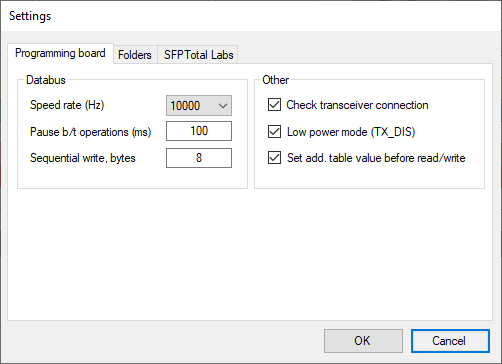
The main settings window contains several tabs.
Programming board
The Programming board tab contains the coding board settings. This section is available only for devices that support the SFPTotal command protocol.
Speed rate (Hz)
Sets the data bus clock frequency and directly affects the transfer speed.
Pause b/t operations (ms)
The delay between data blocks during bus operations. The recommended range is 50 to 250 ms.
Sequential write, bytes
The data block size in bytes for sequential writes. Values from 1 to 128 are supported.
Check transceiver connection
Check that a transceiver is physically connected to the port before reading or writing.
When enabled, the coding board checks whether a transceiver is connected to its port before reading or writing code. An error code is returned if the port is empty.
For example: QERR:SFP_EMPTY.
Low power mode (TX_DIS)
Low power mode. This setting controls the transceiver's TX_DIS line. When enabled, the coding board switches the transceiver to Low power mode, reducing laser output power.
A jumper on the coding board may provide the same function.
Set add. table value before read/write
Automatically select the additional page number when accessing the T00h, T01h, T02h and T03h page address spaces.
When enabled, the coding board automatically writes the additional page number to be addressed in the module's dynamic memory space when reading or writing the corresponding memory area at offset 80h.
Enable this setting when working with optical transceivers.
Disable this setting when working with DAC modules that do not support DDM.
Folders
Codes path for default
The default directory for storing code files.
Script path for default
The default directory for storing script files.
API Button URL
The URL of an external resource for processing code. Clicking the API button sends a request to the specified remote server URL. The server response is returned to the editor.
SFPTotal Labs
This tab contains the user's SFPTotal Labs account details.