Reprogramming write protected SFP RJ45 transceivers
Before reprogramming a write protected SFP RJ45 transceiver, identify the protection method used by that particular module. A hardware WP input, a password and a special save command require different procedures. A matching brand or enclosure does not establish that the circuit is the same: the transceiver part number and hardware revision, and the coding board model and revision, all matter.
This guide covers memory operations on copper SFP modules. Recoding is appropriate when a compatibility requirement or a data change has been established; a compatible module does not need to be reprogrammed simply because it is installed in a new switch. Code cannot add an unsupported speed or change the physical capabilities of the module's interface.
An RJ45 connector identifies the connection medium, not the memory protection method.
Checks before changing EEPROM
- Record the module part number and revision, the switch model and its software version. Save the original Serial ID and the complete Wizard operation response.
- Check the coding board model, hardware revision and activation status. Read support does not imply that every write operation is available.
- Confirm that the required memory area can be read reliably. Compare repeated reads: changing DDM bytes may be normal, but inconsistent permanent identification data requires diagnosis.
- Make a backup of the accessible areas before making any changes. Do not replace the original data with the first firmware image you find.
A0h/A2h, Serial ID and the differences between memory maps are explained in the EEPROM memory guide. An A2h read error or the absence of DDM does not prove either that there is no microcontroller or that hardware write protection is present. The cause may be an unsupported area, an incorrect module type, or a power or connection problem. Start by interpreting the coding board response.
Types of SFP write protection
| Mechanism | Possible symptoms | Requirements |
|---|---|---|
| Hardware WP | Identification can be read, but writes are blocked or are not retained. | A verified circuit for the specific product and control of the required line by a supported coding board. |
| Password or other controller mediated access | Some areas are accessible only after a sequence specified by the manufacturer. | The correct access parameters and value for this implementation; Wizard settings do not determine the password on their own. |
| Special save command | Data can be read back after writing, but the original contents return after a restart. | A documented procedure for committing data, sometimes implemented as a script. |
| Combined protection | A password or a line state change alone is insufficient. | The complete sequence for the relevant revision, including the required module state. |
None of these symptoms proves a protection mechanism on its own. WRITE FAIL can also result from connection problems, an unsupported area or a readback mismatch. For a general classification, see the article on transceiver protection types.
How hardware WP protection works
Some copper SFP modules use a separate EEPROM, such as a chip from the 24C02 family. The chip's Write Protect input controls write access. On a Microchip 24LC02B, connecting WP to VCC prevents array writes, while connecting it to VSS removes this hardware lock. This is a property of that specific chip; a similar designation on another model does not guarantee the same conditions or protected memory range.
The transceiver manufacturer may connect WP to a power circuit or a connector control line. Early SFPTotal experiments encountered designs using power lines, TX_DISABLE or TX_FAULT. However, a brand name alone cannot establish which line is connected to WP. A new part number or revision requires its own circuit verification.
Coding board jumpers and hardware revisions
| Board / source | Verified labels | Limits of the example |
|---|---|---|
| SFPTotal Mini, current manual | TX PWR/TX_VCC, RX PWR/RX_VCC, TX_EN. | Check the function against the markings on your specific board. These controls change line states; they do not automatically identify the protection method. |
| Plus New / Plus X, current manuals | PWR_TX, PWR_RX and other controls described in the model documentation. | Labels may change between hardware revisions. Do not copy contact positions from an older Mini or Plus. |
| P3 and Q3 in the original article | Labels from historical examples; the original article did not record the exact revision numbers. | These examples are not verified instructions for every Plus, Mini or newer coding board. |
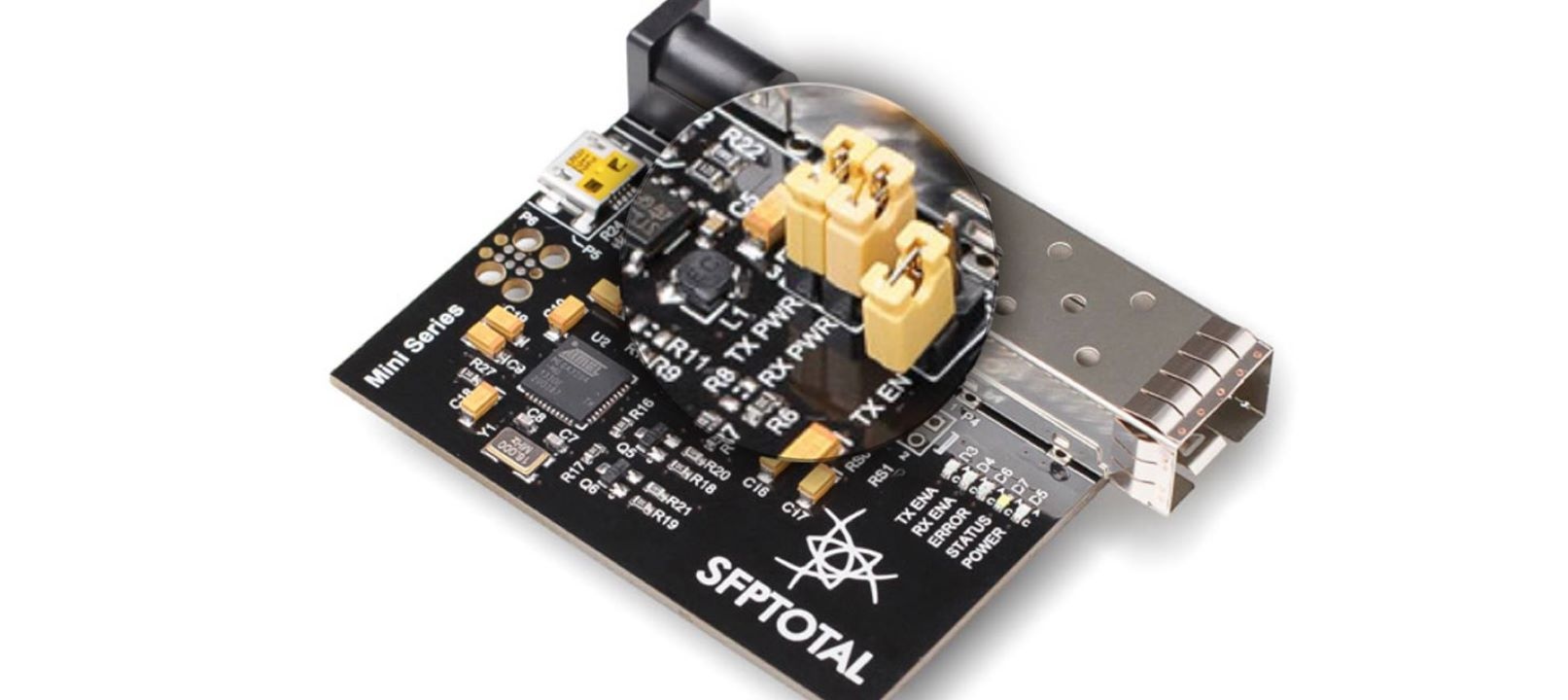
Historical Mini illustration. First compare the markings and layout with your hardware revision.
If the WP pin of a specific SFP is confirmed to be connected to a controllable line, use the controls specified in the coding board manual and the module manufacturer's sequence. Change one verified parameter at a time and record the read and write results. Restore the board's normal configuration when finished.
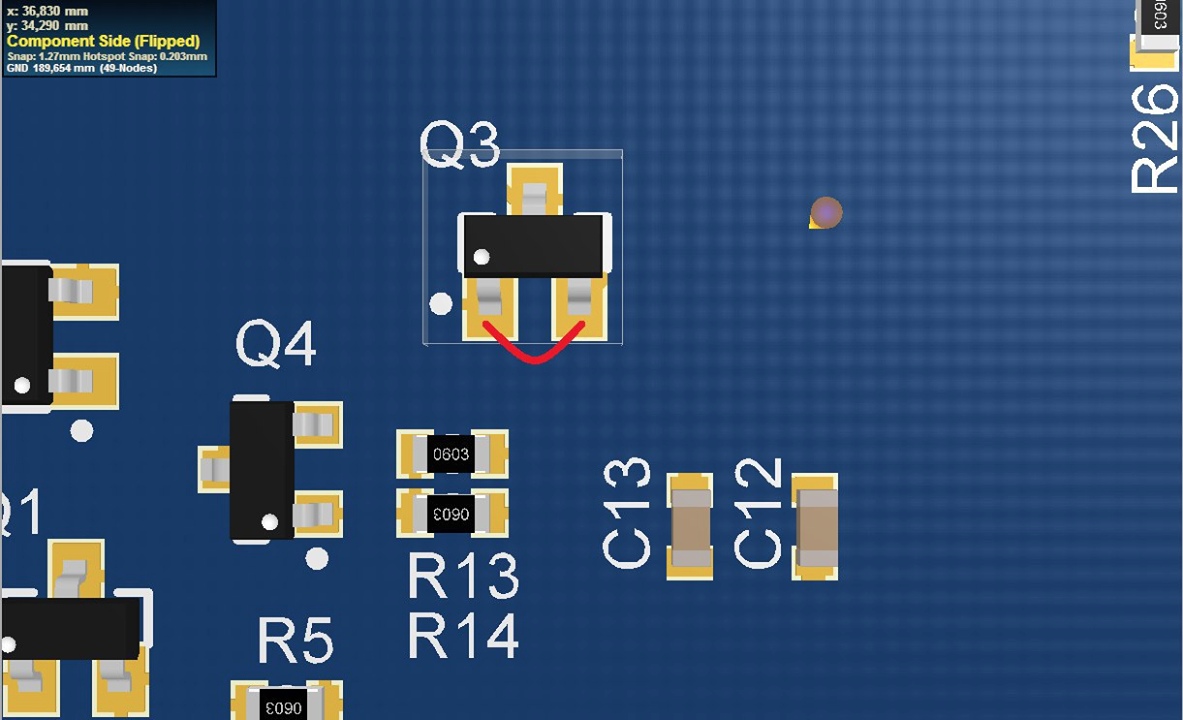
The original Q3 diagram is retained to identify the historical example. Its exact hardware revision is unspecified; it does not establish a universal instruction to bridge Q3 on other boards.
Current descriptions: Mini, Plus New and Plus X. If the layout differs or the circuit is unknown, send support the module part number, board markings and a board photograph. There is no need to guess the function of contacts to establish applicability.
When a password or script is required
In Wizard, the Control → Set a password command configures preliminary password entry. Table address, Password address and Password (Hex) must match the module documentation. For details, see the password writing guide. Working passwords and restricted code sets are not published here.
A2h:7Bh must not be treated as a universal SFP password field defined by SFF-8472: the specification leaves the relevant vendor-specific functions to the manufacturer. SFF-8636 defines a separate optional password mechanism; its parameters must not be applied to SFP modules either.
If a module requires a special save command or access sequence, use an appropriate script only for a verified model and revision. A random script for a similar enclosure does not replace the manufacturer's algorithm.
Workflow: read, back up, modify and verify
- Read the required area with the correct Module Type and Address table. Record the original identification data.
- Create a backup and confirm that it has been saved. When selecting data, follow the firmware database access conditions and recommendations; a matching brand name is insufficient.
- Identify the protection method and confirm that the procedure applies to your revision. Prepare only the necessary changes and an appropriate write algorithm.
- Check the applicable checksums and perform the write operation. Save the complete Wizard response.
- Read the same areas again and compare them with the expected result. After a normal restart, read the permanent data again if the procedure for that module requires it. Current diagnostic values must not be compared as though they were an immutable memory image.
- Check identification and the actual link in the target network equipment. WRITE OK and a correct checksum confirm their respective stages, but do not establish complete compatibility or link integrity.
Sources and applicability
- Microchip 24AA02/24LC02B, DS21709H, Write Protection section: an example of WP input operation.
- SFF-8472 12.5a, sections 4.3 and 10.2: vendor-specific access; SFF-8636 2.12, section 6.2.10: a separate optional password mechanism.
- MSA, SFF and CMIS reference : selecting a specification for a form factor.
This article clarifies previously published experiments. References to MikroTik and D-Link samples tested at the time do not establish applicability to every current part number from those brands. The source data is insufficient for a universal procedure table by revision; specific revisions are not invented.